3DP Chip26.02
Publisher Description
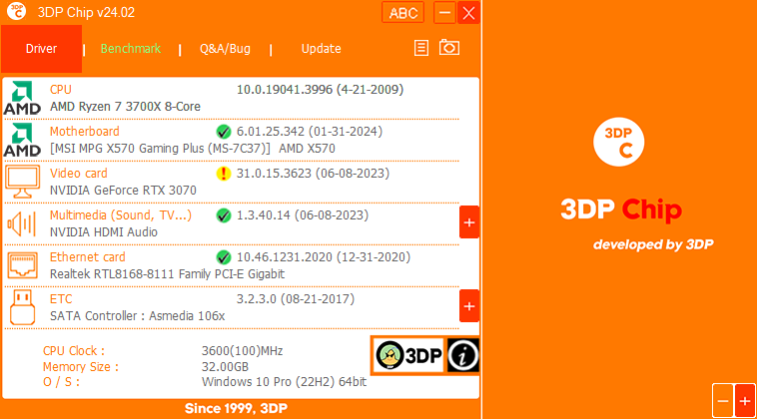
Ever had painful headaches searching through the web trying to find the correct drivers for your newly formatted PC?
3DP Chip and 3DP Net are extremely useful freewares that will minimize your effort and time spent in finding the drivers for your PC components!
3DP Net has the ability to automatically install the right network driver for your PC even if you reinstalled Windows and cannot connect to the internet due to the absence of appropriate driver. 3DP Net will detect which network adapter is installed on your PC and automatically choose the right driver from its integrated ethernet card driver pool that enables to use the internet with breeze.
3DP Chip is another useful program that will automatically detect and display the information on your CPU, motherboard, video card and sound card installed on your PC. You can also choose to copy these information into your clipboard with one click for later use (such as posting in a forum). If you have working internet connection, you can choose to download the latest drivers for all of these components.
We recommend you to run 3DP Net first after reinstalling Windows to detect network adapter and install driver, then once you get hold of internet connection, run 3DP Chip for other component drivers.
About 3DP Chip
This System Maintenance program is available in English, Albanian, Arabic, Chinese, ChineseSimplified, ChineseTraditional, Croatian, Czech, Dutch, Finnish, French, German, Hungarian, Indonesian, Italian, Japanese, Korean, Lithuanian, Malay, Norwegian, Portuguese, Romanian, Russian, Serbian, Sinhala, Spanish, Thai, Vietnamese. It was last updated on 25 March, 2026. 3DP Chip is compatible with the following operating systems: Windows.
The company that develops 3DP Chip is 3DP. The latest version released by its developer is 26.02. This version was rated by 6 users of our site and has an average rating of 2.3.
The download we have available for 3DP Chip has a file size of 7.3 MB. Just click the green Download button above to start the downloading process. The program is listed on our website since 2026-02-19 and was downloaded 4,215 times. We have already checked if the download link is safe, however for your own protection we recommend that you scan the downloaded software with your antivirus. Your antivirus may detect the 3DP Chip as malware if the download link is broken.
How to install 3DP Chip on your Windows device:
- Click on the Download button on our website. This will start the download from the website of the developer.
- Once the 3DP Chip is downloaded click on it to start the setup process (assuming you are on a desktop computer).
- When the installation is finished you should be able to see and run the program.
Program Details
General
System requirements
Download information
Pricing
Version History
version 26.02
posted on 2026-02-19
https://www.3dpchip.com/3dpchip/sub/history/3DP_Chip_v26_History.txt
version 25.10
posted on 2025-10-18
https://www.3dpchip.com/3dpchip/sub/history/3DP_Chip_v25_History.txt
version 25.02
posted on 2025-02-08
https://www.3dpchip.com/3dpchip/sub/history/3DP_Chip_v24_History.txt
version 23.09
posted on 2023-09-29
https://www.3dpchip.com/3dpchip/sub/history/3DP_Chip_v23_History.txt
version 16.07
posted on 2016-07-27
http://www.3dpchip.com/3dpchip/sub/history/3DP_Chip_v16_History.txt
version 14.02
posted on 2014-02-28
http://www.3dpchip.com/3dpchip/sub/history/3DP_Chip_v14_History.txt
